

Personalised Journal Art
Your journal illustrations are shaped by your own photos, so the art looks like your life.
Overview
Every journal entry gets its own illustration — a small piece of art at the top of the entry, created from what you wrote. Over time, that art starts to look like your life: your dog stays your dog across entries, the people in it look like your people, and the rooms look like your rooms. Onsen does this by quietly using photos you've already shared as visual references, so a journal you scroll back through months later actually reminds you of the moments.
You don't have to turn anything on. Once you've set up your avatar and started sharing photos in chat, your future entries pull from those references automatically whenever they're relevant.
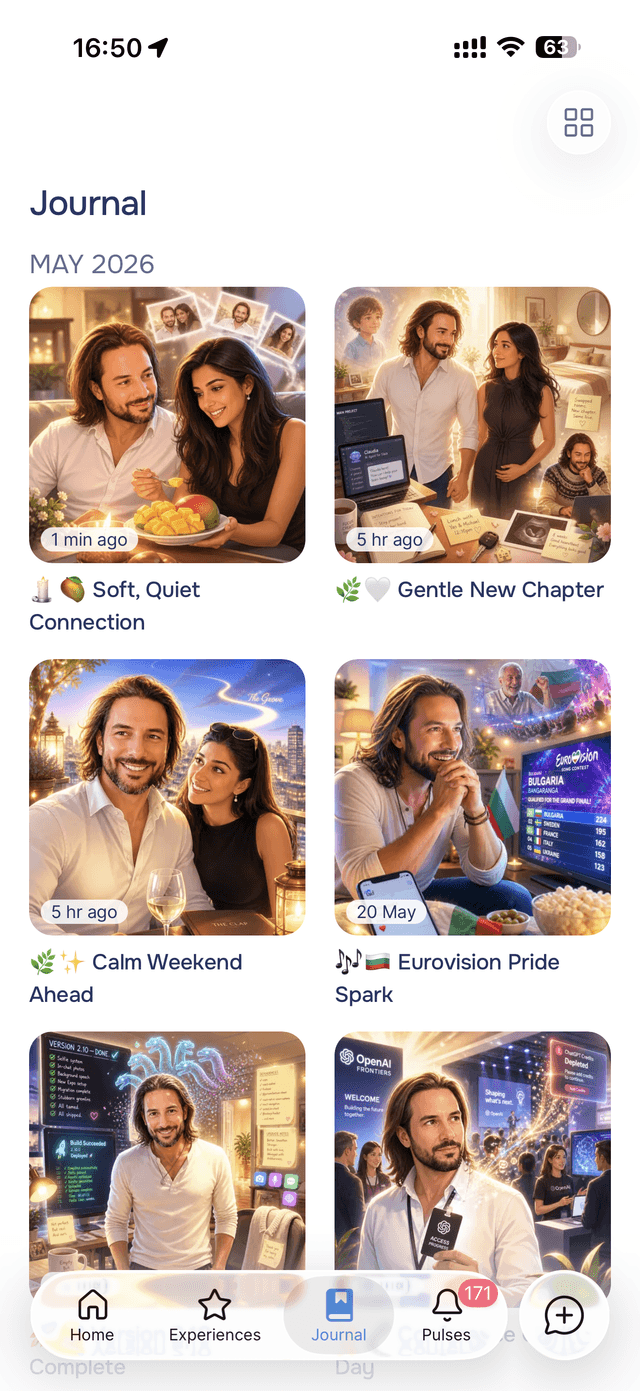
How Onsen Personalises Your Art
Two kinds of photos become references.
Your avatar selfies anchor you
When you set up your avatar, you share a few photos of yourself. Onsen uses those as an identity reference, so when an entry involves you, the person in the illustration consistently looks like you — woven into whatever scene fits what you wrote that day.
Your chat photos anchor everything else
Every photo you share with your guide in chat is quietly looked at in the background after the reply lands, and tagged for what's in it: your dog, your kitchen, a friend. Later, when a journal entry mentions that dog or that kitchen, the matching photo is pulled in as a scene reference and woven into the illustration. The more of your world you share, the more the art remembers.
Getting Personalised Art
- Set up your avatar with a few clear photos of yourself — see Design Your Avatar.
- Share photos in chat of the people, pets, and places in your life as they come up.
- Keep journaling. Future entries automatically pull in whichever references fit what you wrote, with no extra steps.
The art appears at the top of each entry when you create it, and shows up as the cover on your journal grid. If you'd like a different take, you can re-generate the image from the entry's menu.
Your Photos Stay Private and Safe
- Every reference photo is checked. Anything that doesn't pass the same safety bar used for avatar setup is filtered out automatically and never used in your art.
- Your photos are yours. They're private to your account, used only to illustrate your own entries, and deleted when you remove them or delete your account. See the Privacy Policy.
Tips
- Share the recurring characters — a few good photos of your dog, your partner, or your favourite room give Onsen the references it needs to make your art feel like yours.
- A clear avatar helps most — well-lit selfies from your avatar setup are the anchor for how you appear across entries.
- It gets better over time — early entries may look more generic; as you share more of your world, the art grows more personal.