

What's New
Read what changed in each Onsen release, and find out when a newer version is waiting for you.
Onsen ships often, and things move. What's New is where each release explains itself — what was added, what changed, and what to go and try.
Where to Find It
Go to Settings → What's New. A dot appears next to it when there is a release you have not read.
You will also see a floating button on your Home screen when something is unread, and Onsen opens the page for you once after an update so you are not left wondering why the journal looks different.
Reading a Release
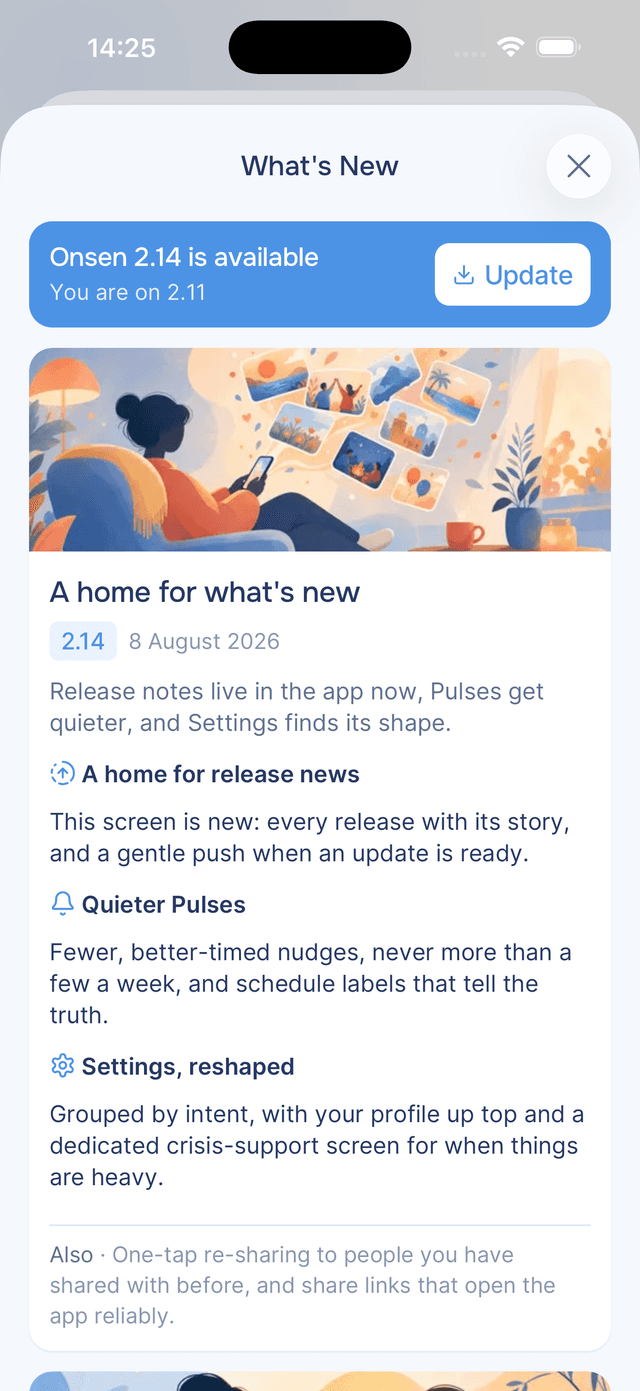
Each release gets a card with an image, its version number, the date it shipped, and a short summary followed by the detail — grouped by area, so you can read only the parts you care about. Smaller follow-up releases are folded into the one they belong to, marked Also in 2.15.1.
Where a release has a fuller story behind it, Read more on the blog opens the write-up on the Onsen website.
Updating the App
If a newer version is available in the App Store or Google Play, a banner sits at the top telling you which version you are on and which one is out. Tap Update to go straight to the store listing.
Tips
- Read it after an update rather than dismissing it — most features people ask support about were announced here.
- Pull down to refresh — release notes arrive from the server, so a pull gets the newest ones.
- Missing a feature you read about? Check the banner. The notes describe the newest release, which may not be the version installed on your phone yet.