

Getting Started Checklist
Complete nine introductory steps to explore Onsen's core features and get the most out of the app.
Overview
After you sign up and choose your AI guide, a "Getting started" checklist appears on your Home screen. It is a quick tour of everything Onsen can do — nine steps that introduce you to chatting, journaling, voice features, guided experiences, and more. You can tackle them in any order, and each one takes just a few minutes.
Your Progress
A progress bar at the top of the checklist tracks how many steps you have completed. By default, you will see up to five incomplete steps — tap "Show all" to see the full list, including ones you have already finished. Once you have completed all nine, the checklist fades away from your Home screen.
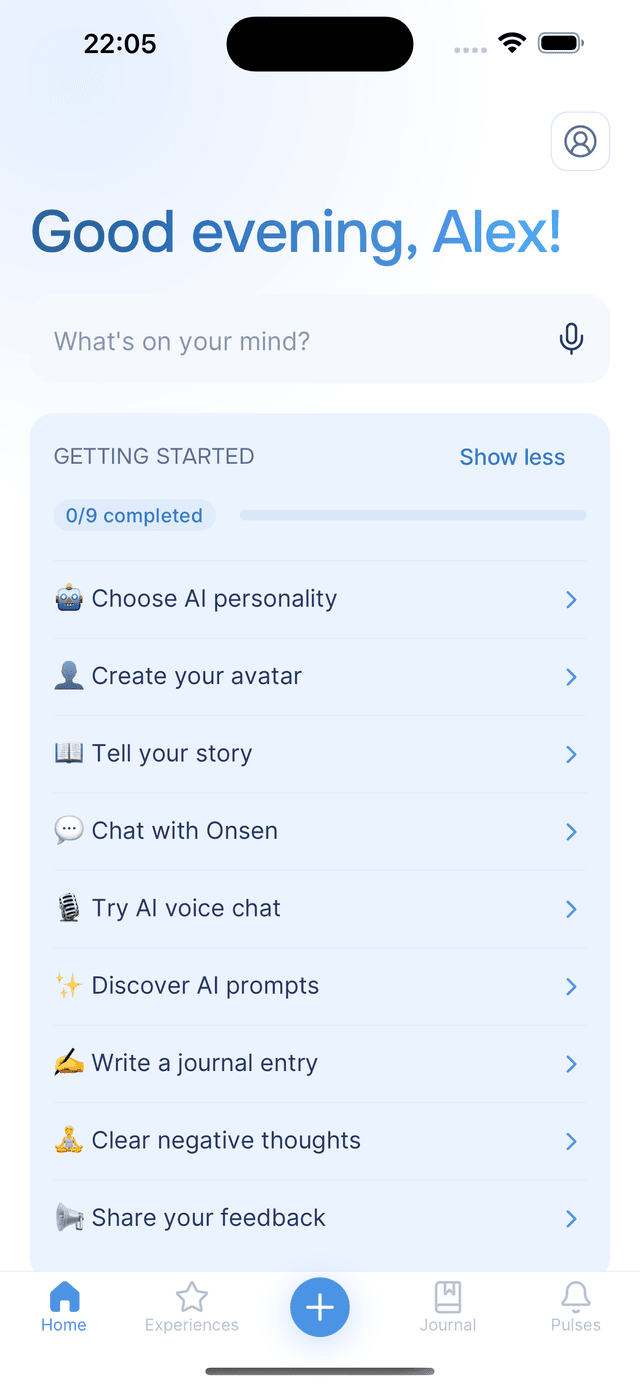
The Nine Steps
1. 🤖 Choose AI personality
Pick your AI guide from the available personalities. Each one brings a different tone to your conversations. See Choose AI Personality for details.
2. 👤 Create your avatar
Work with your AI guide to generate a personalized avatar for your profile through the Create your avatar experience.
3. 📖 Tell your story
Share a bit about yourself in the Tell your story experience. This helps the AI personalize its responses to you going forward — the more it knows about you, the better it can support you.
4. 💬 Chat with Onsen
Have your first open conversation with your AI guide through Just chat. Talk about whatever is on your mind.
5. 🎙️ Try AI voice chat
Send your first voice message during a chat. Just tap the microphone button, speak, and submit. It is a hands-free way to express yourself when typing does not feel right.
6. ✨ Discover AI Prompts
Try an AI Prompt during a chat — tap the AI Prompts button and pick one. Prompts let the AI do things like ask you deeper questions, offer a new perspective, or give personalized advice. See AI Prompts for all available prompts.
7. ✍️ Write a journal entry
Create your first journal entry by saving a conversation. During a chat, tap the Add to Journal button to turn the conversation into a journal entry you can reflect on later.
8. 🧘 Clear negative thoughts
Start the Clear negative thoughts experience — it helps you identify and reframe negative thought patterns using evidence-based techniques.
9. 📣 Share your feedback
Tell the Onsen team what you think. This opens a quick feedback form where you can share your thoughts directly. See Support for all feedback options.
Tips
- Go in any order — the steps are numbered, but you can do them however feels natural.
- Each step teaches a feature — by the time you finish the checklist, you will have explored all of Onsen's core capabilities.
- Tapping a step takes you there — no need to navigate manually. The checklist links directly to the relevant part of the app.