

AI Prompts
Use the AI Prompts menu to ask for questions, advice, a new perspective, and more during your conversations.
Overview
Sometimes mid-conversation you want to steer things in a specific direction — get the AI to ask you thought-provoking questions, offer advice, or help brainstorm. AI Prompts let you do exactly that with a single tap, without having to figure out how to word your request.
Finding AI Prompts
Tap the button next to the message input to open the Chat tools sheet. The AI Prompts — Question, Perspective, Advice, and more — sit just below the Camera and Photos tiles. Tap any one to trigger it: each sends a message on your behalf that tells your AI guide what kind of response you're looking for.
AI Prompts are available in Just Chat and Guided Journaling — the two free-form conversation types where you are leading the discussion. The Camera and Photos tiles in the same sheet are covered in Image Attachments.
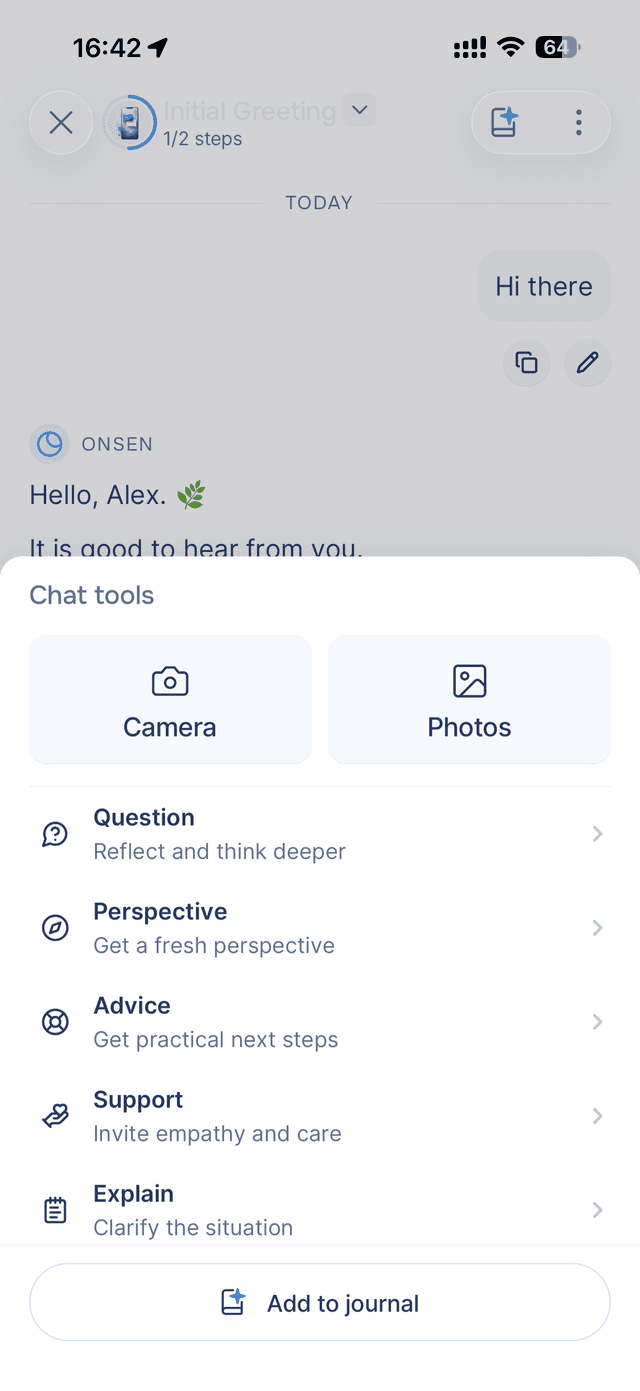
Available Prompts
Here is what each prompt does when you tap it:
| Prompt | What it does |
|---|---|
| Question | Asks the AI to ask you thought-provoking questions that help you think more deeply about what you have been discussing. |
| Perspective | Asks the AI to offer a different angle on the situation you have been talking about. |
| Advice | Requests personalized advice based on what you have shared so far. |
| Support | Asks the AI to focus on emotional support — validating what you are feeling and offering reassurance. |
| Explain | Asks the AI to go deeper on its last response — expanding on ideas, clarifying points, or adding detail. |
| Brainstorm | Kicks off a creative brainstorming session with ideas, options, or approaches related to your conversation. |
Tips
- Try different prompts on the same topic — asking for questions, then perspective, then advice on the same subject gives you a well-rounded exploration.
- Use prompts after sharing something — they work best when the AI has context from your conversation. Share what is on your mind first, then tap a prompt.
- Combine with your own messages — AI Prompts and free typing work together. Share what is on your mind first, then use a prompt to take the conversation deeper.